Windows app · free

Sign documents from the right-click menu.

Lawyerd Sign is a small Windows app for the paperwork a company signs every week: invoices, acts, NDAs, contracts. It finds the line meant for your company, places your signature and the date, and saves a signed copy next to the original. Before it signs, it reads the document for the things that should stop you.

FreeWindows 10 and 1124 MBno account

LAWYERD SIGN · WINDOWS Signed on your line Right-click · about a second THE DOCUMENT BEFORE IT SIGNS YOUR LINE THEIR LINE Totals net + VAT = gross Bank details same as in past documents Hidden text none on the page Scripts none in the file COPY NEXT TO THE ORIGINAL Invoice (signed with Lawyerd).pdf SIGNED
At a glanceFree
PDF, DOCX, DOCA Word file is saved as a signed PDF
One 24 MB fileNo administrator rights · nothing else to install
About a secondPer document, from the menu
On your PCDocuments are not uploaded anywhere
§ 02 · See it work

A minute of clicking becomes one right-click and a check.

Demo data · invented documents
§ 03 · Why it exists

Signing takes a minute. Reading again is what gets skipped.

Most business documents are signed the same way: open the file, scroll to the last page, drop in the signature image, save a copy. It is a minute of clicking, repeated for every invoice and act, and nobody reads the bank details again on the tenth one.

That habit is what payment fraud counts on: a familiar counterparty, a familiar layout, one changed account number. Lawyerd Sign takes the clicking away and puts a check in its place. The signature goes on in about a second; a changed account, totals that do not add up or text you cannot see stop it and ask you first.

We wrote it for our own invoices, acts and contracts at Lawyerd. Now any company can download it, free.

§ 04 · How it works

Three steps, and the first one is a right-click.

  1. 01

    Right-click the file

    A PDF or a Word document, one file or a whole selection. Choose “Sign (Lawyerd)” in the Explorer menu. A batch ends with one notification: signed N of M.

  2. 02

    It finds your line

    The app reads the page and looks for the signature block that belongs to your company: by name, by signatory, by role in the document. The counterparty’s line is left alone. An empty date field next to yours gets today’s date in the document’s own format.

  3. 03

    A signed copy appears

    Next to the original, with “(signed with Lawyerd)” in the name. The original is never overwritten, and digital signatures already inside the PDF stay valid.

§ 05 · Screenshots

The preview, a red flag, the first start.

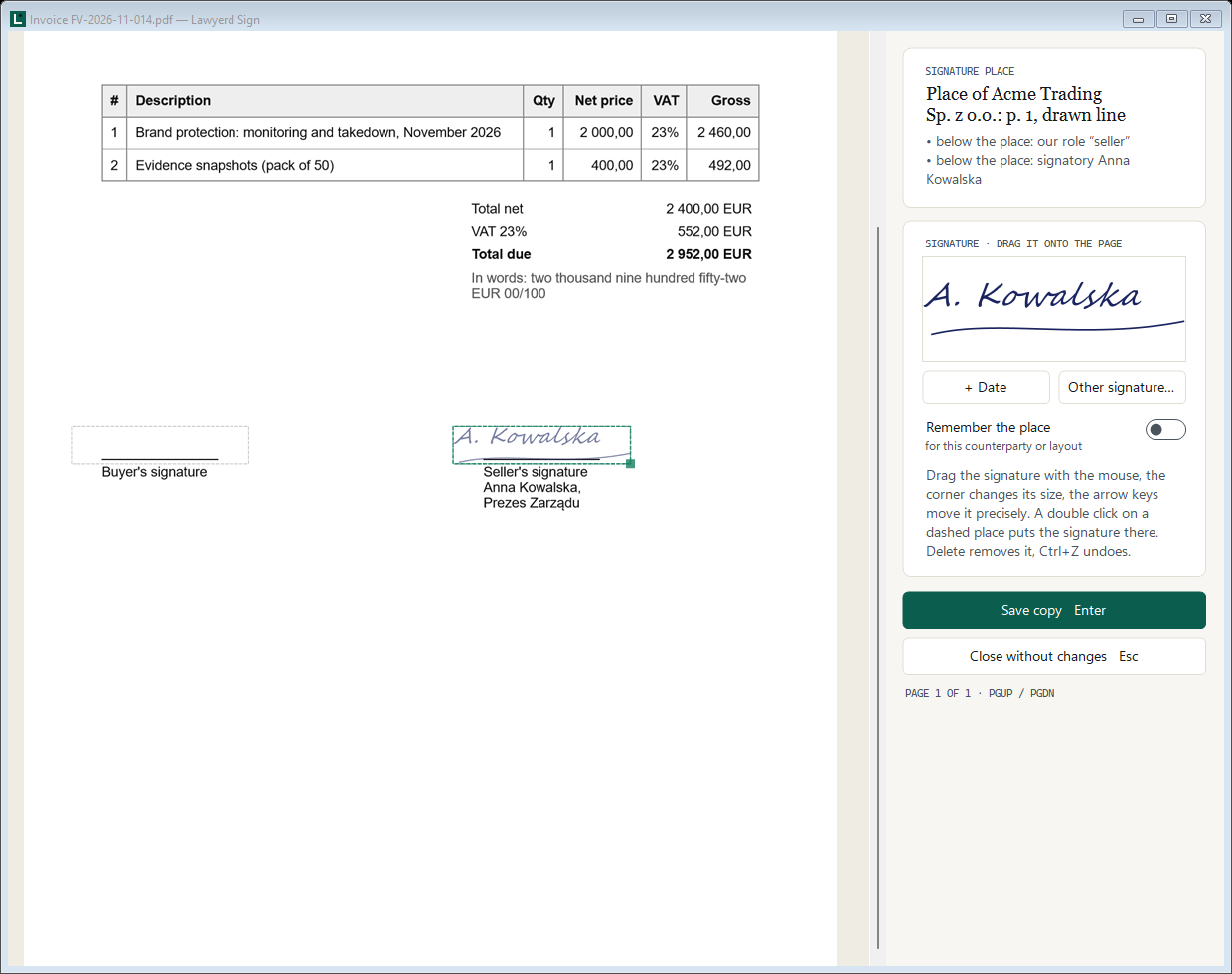
Lawyerd Sign preview window on a sample invoice: the signature on the seller’s line; on the right, the place the app found and why, the signature image and the “Remember the place” switch.
The preview: the place the app found and why, the signature to drag, and “Remember the place” for the next document on this layout.
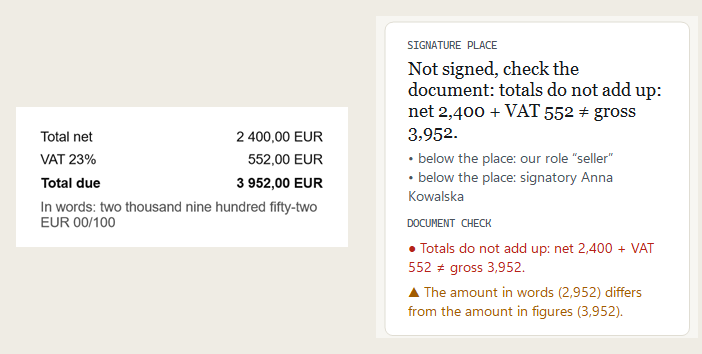
A red flag in the preview: net 2,400 plus VAT 552 does not equal the gross 3,952, and the amount in words differs from the figure.
A red flag stops the one-click signature. Here net plus VAT does not give the gross, and the amount in words is different.
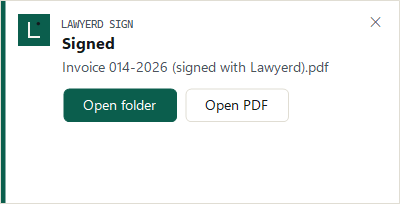
Windows notification from Lawyerd Sign: Signed, with the name of the signed copy and buttons to open the folder or the PDF.
Signed: the copy lies next to the original, one click opens it.
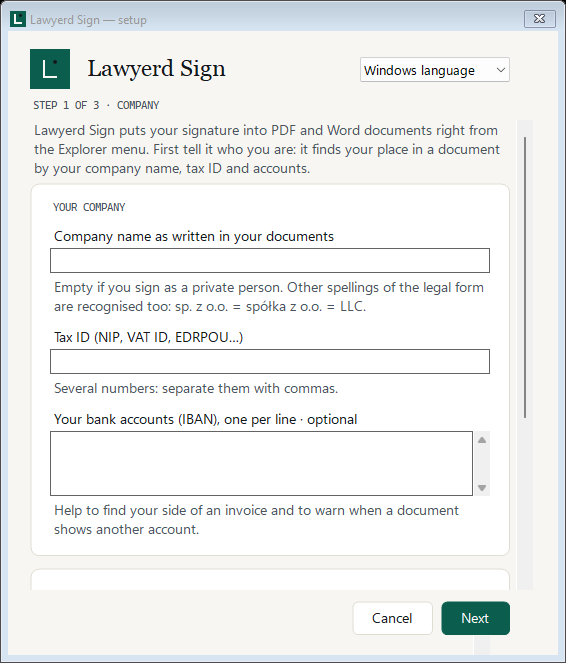
Lawyerd Sign first start, step 1 of 3: company name as written in documents, tax ID and optional bank accounts.
First start, step 1 of 3: your company. Then the signer and the signature image.
§ 06 · What it checks

Read first, then signed.

Stops the signature

Red flags

The one-click signature does not go through. The preview opens with the flag, and you decide.

  • Totals that do not add up: net plus VAT differs from gross
  • The counterparty’s bank account differs from the one in their earlier documents
  • Invisible text, or white text on a white page
  • JavaScript inside the PDF, or an action that launches a program
Signed, and mentioned

Yellow flags

The document is signed, and the notification tells you what to look at.

  • The amount in words differs from the figure (English and Polish)
  • A due date earlier than the issue date, or an issue date in the future
  • Your own account number is not on your list, or differs from last time
  • The same file, or the same document number for this counterparty, was signed before
  • An amount several times the usual one for this counterparty
  • Files embedded in the PDF, microscopic text, text off the page

The checks are rules, not a model: they run on your PC, and nothing written in the document can talk them out of a flag. The checks against history compare a document with the ones you signed in the app before, so they start working from a counterparty’s second document.

§ 07 · When it is not sure

If the place is in doubt, it asks.

A new template, or two lines that both fit: when the app is not confident, it does not guess. It opens a preview with the signature where it proposes to put it.

Drag it, resize it, or double-click another line the app found. Tick “Remember the place”, and the next document on that template is signed without a question.

The preview is also a menu item of its own, “Sign with preview”, for the documents you would rather look at first.

§ 08 · What it is not

An image of your signature. Not a qualified one.

Lawyerd Sign puts a picture of your handwritten signature on the page: the way invoices, acts and routine contracts are signed between companies every day.

It adds no certificate and no cryptographic seal. In EU terms that is a simple electronic signature, not an advanced or a qualified one. Where the law or your counterparty asks for a qualified signature, use one. Certificate-based signing of PDFs is planned for a later version.

§ 09 · Your documents

What stays on your PC, and the little that does not.

Documents
Read, checked and signed on your PC. No document, file name or line of text is sent anywhere.
Your profile
Company details, signature image, remembered templates and signing history stay in your Windows profile.
Usage statistics
Anonymous counts, not content: how many documents were signed, how the place was found, which checks fired, the app and Windows version. Never file names, document text, counterparties, amounts, your name or your company. You choose on the first start and can switch it off any time in Settings.
Updates
Every six hours the app asks Lawyerd’s server for a new version, sending only a random install ID, its version and the Windows build. It installs a new version only if the file is signed by Lawyerd and its checksum matches.
Optional AI review
Off by default. With your own Claude API key, a document can be sent to Anthropic’s API for a second read before signing, and nowhere else.

→ The full privacy policy

§ 10 · The app itself

Small on purpose.

Price
Free, for personal and commercial use. No account, no trial, no card.
System
Windows 10 (version 1809 or later) or Windows 11, 64-bit.
Languages
English, Ukrainian, Russian and Polish, picked from your Windows language.
Files
PDF, including password-protected ones. Word: DOCX out of the box, older DOC when Microsoft Word or LibreOffice is installed.
Install
One code-signed file of 24 MB. No administrator rights and nothing else to install.
Batch
Select several files and sign them in one go; one notification at the end.
Contracts with annexes
Every page that carries your signature line is signed in one pass.
Removal
Through Windows Settings, like any app. Your profile is kept unless you ask to remove it.
macOS
Planned. Windows comes first.
§ 11 · Common questions

Asked before installing.

Is Lawyerd Sign free?

Yes, for personal and for commercial use. Download the file from this page and run it: there is no account, no trial period and no card to enter.

Is a signature placed by Lawyerd Sign legally valid?

It is an image of your handwritten signature on a PDF. In EU terms that is a simple electronic signature: the law does not deny it effect just because it is not a qualified one, but whether it is enough depends on the document and the law that governs it. For invoices, acts and routine contracts between companies it is what is used in practice. It is not a qualified electronic signature, and this answer is not legal advice on your document.

Does the document leave my computer?

No. Reading, checking and signing happen on your PC. The app sends Lawyerd only anonymous usage counts, which you can switch off, and asks for updates; neither carries a file name, a name or a word of the document. The optional AI review is off by default; if you switch it on with your own Claude API key, the document is sent to Anthropic’s API for that check and nowhere else.

How do I install it?

Run the downloaded file. It installs for your Windows user without administrator rights and adds “Sign (Lawyerd)” to the right-click menu. On the first start it asks for your company name, tax number, the signer’s name and title and a picture of the signature (PNG or JPG; the background is removed), and your bank accounts if you want them checked. The file is code-signed: Windows shows the publisher as LAWYERD! SPÓŁKA Z OGRANICZONĄ ODPOWIEDZIALNOŚCIĄ.

What happens to the original file?

Nothing. The app writes a copy next to it with “(signed with Lawyerd)” in the name. The copy is the original’s bytes plus an update appended at the end, which is why digital signatures already in the PDF remain valid.

What if the signature lands in the wrong place?

Delete the copy and use “Sign with preview”: drag the signature where it belongs and, if you sign that template often, tell the app to remember the place.

Which files can it sign?

PDF, including password-protected ones: the app asks for the password. Word documents are converted to PDF and signed: DOCX directly, older DOC files when Microsoft Word or LibreOffice is installed.

Is there a version for macOS?

Not yet. Windows comes first; macOS is planned.

§ 12 · Download

Sign the next invoice with a right-click.

Free for Windows. One file, no account and no administrator rights; it keeps itself up to date.

  1. 01Download the file and run it
  2. 02Add your company, the signer and the signature image
  3. 03Right-click a PDF or Word file, choose “Sign (Lawyerd)”

Prefer Telegram? Message @lawyerdsupport and we reply there.

Lawyerd Sign for Windows
Download for Windows
Version
Latest
File
LawyerdSign.exe · 24 MB
System
Windows 10 or 11, 64-bit
Publisher
LAWYERD! sp. z o.o., code-signed
Price
Free, also for business

By downloading you accept the licence agreement · Privacy policy
Windows only for now; macOS is planned.